

Baby monitor without Wi-Fi: camping, travel and holiday rentals
Camping, cottage, hotel room, family home without a router: Lullink doesn't need the internet. It just needs a small network linking your devices, and a phone can create one.
When Wi-Fi isn't enough
Lullink links the camera and the parents over the local network: it works on any Wi-Fi, as long as the devices can see each other. That's not the case:
- when there's no Wi-Fi at all: camping, travel, holiday rental, family home without a router;
- on many hotel, cottage or “guest” Wi-Fi networks, which isolate devices from each other for security.
In these cases, create your own small network. There are two ways to do it.
With an Android phone: “No Wi-Fi? Camping, travel…”
An Android phone or tablet (Android 8.0 or later) creates the network that links your devices by itself.
- On Lullink's home screen, tap “No Wi-Fi? Camping, travel…”, then “Create the Lullink network”. The device creates a network and shows a QR code, with the network name and password.
- On the other device, open the camera app, point it at this QR code and tap Join.
- Open Lullink on both devices, just like at home.
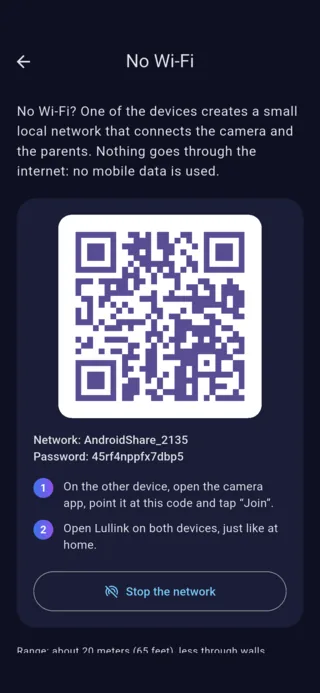
To create this network, Android asks for the “Nearby devices” permission (Android 13 and later) or location (Android 8 to 12, to be turned on). It's only used to create the network: your location is never read. The network stops if you close Lullink on the phone that created it.
With an iPhone: Personal Hotspot
An iPhone can't create a local network on its own, but its Personal Hotspot does the job just as well.
- On the iPhone: Settings → Personal Hotspot, then turn on “Allow Others to Join”.
- On the other device, join this iPhone's Wi-Fi network.
- Open Lullink on both devices, just like at home.
Personal Hotspot depends on your mobile plan, and an iPad without a SIM card can't offer it.
What about mobile data?
On this small network, Lullink's picture and sound go straight from one device to the other: they don't use your data plan. With an iPhone's Personal Hotspot, however, the other apps on the connected device can use the iPhone's data: limit their automatic updates if needed.
Our tips
- Plug in the phone that creates the network: it uses more battery.
- Keep the devices fairly close, as with ordinary Wi-Fi: the camera in the nursery, your phone in the next room.
- Try it before bedtime: on the camera, “Send a test alert to parents” checks that alerts actually reach you.