

Baby monitor with an iPhone and an Android: mixing brands
In many families, phones aren't all the same brand. With Lullink, the camera and the parents can be iPhones, iPads, Android phones or tablets, in any combination.
Every combination works
- an Android camera and an iPhone parent;
- an iPhone or iPad camera and an Android parent;
- and of course Android with Android, iPhone with iPhone.
Several parents can watch the same camera at the same time, each on their own device, and each parent can follow up to four rooms at once. Lullink is available on Google Play; the iPhone and iPad version is coming soon to the App Store.
How the devices connect
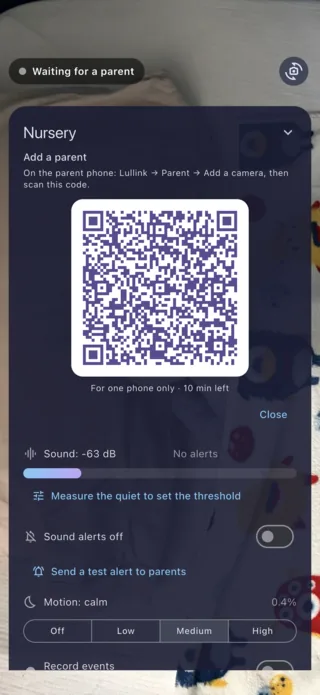
The camera device shows a QR code, and the parent phone scans it. This QR code lets the parent recognize its camera and encrypt the connection: picture and sound are then end-to-end encrypted between the two devices, whatever their brand. A QR code can only be used once, within 10 minutes.
What changes from one device to another
An iPhone or iPad as the camera
iOS turns the camera off as soon as the app is no longer on screen. Keep Lullink open on the camera device, plugged in, and use the black screen at night. If the app still goes to the background, the parents are warned.
An Android phone or tablet as the camera
Keep it plugged in, with Lullink open on screen. It's also the one that can create a network when there's no Wi-Fi.
An iPhone as the parent
With the phone locked, the room sound keeps playing and alerts still show up. On iOS 16.1 and later, listening appears on the lock screen, and in the Dynamic Island on iPhones that have one. With the next version, Apple Watch will also show each room and its alerts.
An Android phone as the parent
While listening, the “Lullink is listening” notification, followed by your room's name, keeps listening active with the screen off; if you swipe it away, it comes back on its own. On some phones, Samsung in particular, allow Lullink in the battery settings: Settings → Apps → Lullink → Battery → Unrestricted.
What about the TV?
With the next version, the nursery will also show on the big screen with an Apple TV or an Android TV, whatever the camera's brand. The TV is added with a 6-digit code, shown on both screens and approved on the camera.
Without Wi-Fi, with different brands
An Android phone can create the network, and the iPhone joins it by scanning a QR code. An iPhone can also share its connection with an Android device. Step-by-step instructions are in our guide Baby monitor without Wi-Fi.